Client Management
KrakenHashes allows associating hashlists with specific clients or engagements. This helps organize work and enables tailored settings, such as data retention policies, potfile controls, and dedicated client wordlists.
Overview
- Purpose: Clients represent distinct entities (e.g., internal teams, external customers, specific penetration testing engagements) for which hashlists are managed.
- Association: Hashlists can be optionally linked to a client during upload.
- Administration: Administrators can create, view, update, and delete client records.
- Client Potfile: Each client can have an automatically generated potfile containing passwords cracked from their hashlists, usable as a targeted wordlist in future jobs.
- Client Wordlists: Clients can have dedicated wordlists uploaded and managed separately from the global wordlist system.
- Potfile Controls: Per-client settings control whether cracked passwords are written to the global potfile, the client potfile, and whether passwords are surgically removed when hashlists are deleted.
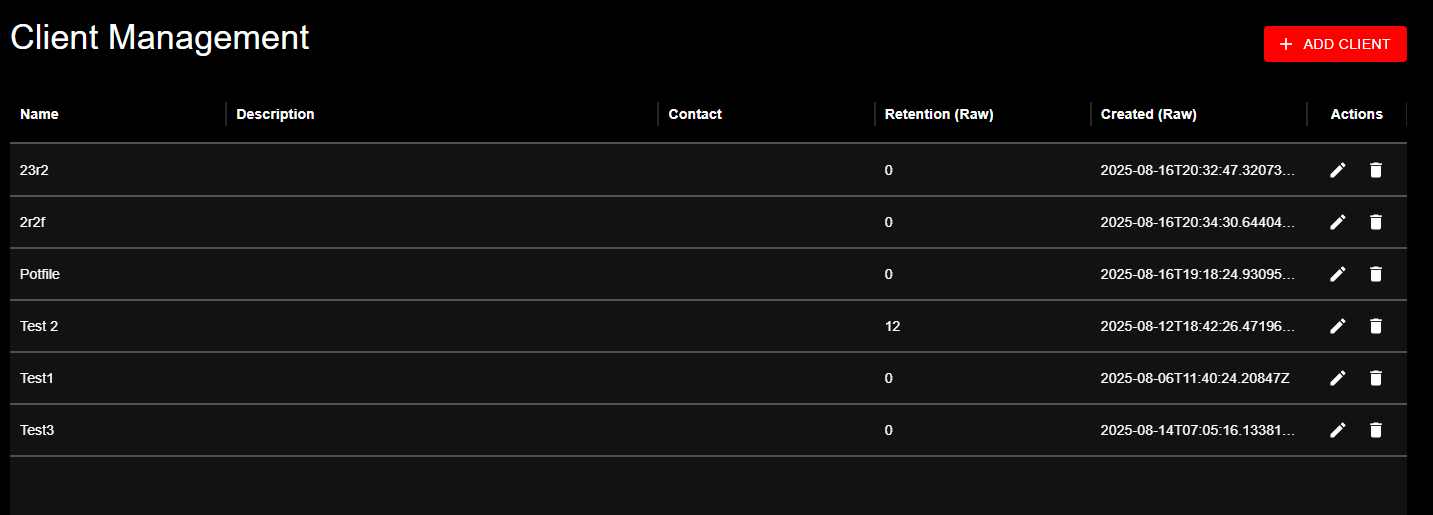 Client Management page showing the data table with columns for Name, Description, Contact, Retention period, Creation date, and available Actions
Managing Clients via API
Administrators use the following API endpoints to manage clients:
-
GET /api/admin/clients- Description: Lists all existing clients.
- Response: An array of client objects.
-
POST /api/admin/clients- Description: Creates a new client.
- Request Body (Example):
nameis required and must be unique.descriptionandcontact_infoare optional.- Response: The newly created client object.
-
GET /api/admin/clients/{id}- Description: Retrieves details for a specific client by its UUID.
- Response: A single client object.
-
PUT /api/admin/clients/{id}- Description: Updates an existing client.
- Request Body: Same format as POST, but fields are optional (only provided fields are updated).
- Response: The updated client object.
-
DELETE /api/admin/clients/{id}- Description: Deletes a client.
- Important: Deleting a client typically also involves cleaning up associated resources like hashlists or reassigning them. The exact behavior might depend on implementation details (e.g., whether associated hashlists are deleted or disassociated).
- Response: Typically a 204 No Content on success.
Client Fields
| Field | Type | Default | Description |
|---|---|---|---|
name | string | (required) | Client name, must be unique |
description | string | (optional) | Free-text description |
contact_info | string | (optional) | Contact information |
exclude_from_potfile | boolean | false | When true, cracked passwords for this client are NOT added to the global potfile |
exclude_from_client_potfile | boolean | false | When true, cracked passwords for this client are NOT added to the client-specific potfile |
remove_from_global_potfile_on_hashlist_delete | boolean or null | null | Controls automatic removal from global potfile on hashlist delete. null = use system default, true = always remove, false = never remove |
remove_from_client_potfile_on_hashlist_delete | boolean or null | null | Controls automatic removal from client potfile on hashlist delete. null = use system default, true = always remove, false = never remove |
Note on exclusion semantics: The
exclude_from_*fields use "exclude" semantics. The default value offalsemeans "include" (passwords ARE written to the potfile). Setting totruemeans "exclude" (passwords are NOT written).Note on null removal settings: When set to
null, the system default fromsystem_settingsis used. When set to a boolean, it overrides the system default and the user cannot change it at hashlist delete time. This enables administrators to enforce data retention policies per client.
Client Potfile
Each client automatically gets a potfile that accumulates unique cracked passwords from the client's hashlists. This potfile can be used as a targeted wordlist in future cracking jobs.
How It Works
- When a password is cracked from a hashlist associated with a client, the password is staged with the client's ID
- The background worker routes the password to the client's potfile (if permitted by the three-level cascade)
- The potfile is stored at
wordlists/clients/{client_uuid}/potfile.txt - Metadata (size, line count, MD5) is tracked in the
client_potfilesdatabase table
Viewing Client Potfile Information
Via UI: Navigate to Admin → Clients, then click the folder icon (Wordlists action) for a client. The second tab "Client Potfile" shows the potfile metadata.
Via API:
-
GET /api/clients/{id}/potfile- Description: Returns metadata about the client's potfile.
- Response:
- Returns
404if no potfile exists yet for the client.
-
GET /api/clients/{id}/potfile/download- Description: Downloads the client's potfile as a text file.
- Response: Raw text file with
Content-Disposition: attachmentheader.
Using the Client Potfile in Jobs
When creating a job for a hashlist that belongs to a client with a potfile, the wordlist dropdown in the Create Job dialog displays the client potfile under a "Client Specific" category. It appears as:
Select it like any other wordlist. The system handles routing and agent distribution automatically.
Potfile Lifecycle
- Created: Automatically when the first password is routed to the client
- Updated: By the background worker whenever new passwords are staged for the client
- Deleted: When the client itself is deleted (cascade), or via the API
- Regenerated: When a hashlist is deleted with "remove from client potfile" enabled (see Potfile Management - Surgical Removal)
For full details on potfile management, the three-level cascade system, and surgical removal, see the Potfile Management guide.
Client Wordlists
Client wordlists are general-purpose wordlists uploaded for a specific client. Unlike association wordlists (which are tied to a specific hashlist and require line-count matching), client wordlists can be used with any attack mode on any of the client's hashlists.
Storage
Client wordlists are stored alongside the client potfile:
The filename potfile.txt is reserved and will be rejected if used as a client wordlist name.
Managing Client Wordlists via UI
- Navigate to Admin → Clients
- Click the folder icon in the "Actions" column for the desired client
- The Client Wordlist Management dialog opens with three tabs:
- Client Wordlists (Tab 1): Upload, view, delete, and download client-specific wordlists
- Client Potfile (Tab 2): View potfile info (size, line count, last updated), download the potfile
- Association Wordlists (Tab 3): View all association wordlists across the client's hashlists (with hashlist name), download or delete
Uploading a wordlist: 1. Click "Upload Wordlist" button in the Client Wordlists tab 2. Select a file from your machine 3. The system automatically: - Sanitizes the filename - Counts the lines in the file - Calculates the MD5 hash - Stores the file in wordlists/clients/{client_uuid}/{sanitized_filename} - Creates a database record in client_wordlists
Managing Client Wordlists via API
-
GET /api/clients/{id}/wordlists- Description: Lists all wordlists for a client.
- Response: Array of client wordlist objects:
-
POST /api/clients/{id}/wordlists- Description: Uploads a new wordlist for the client.
- Request:
multipart/form-datawith afilefield. - Response: The created wordlist object with line count and metadata.
-
GET /api/clients/{id}/wordlists/{wordlist_id}- Description: Retrieves metadata for a specific client wordlist.
-
DELETE /api/clients/{id}/wordlists/{wordlist_id}- Description: Deletes a client wordlist (both database record and file).
-
GET /api/clients/{id}/wordlists/{wordlist_id}/download- Description: Downloads the wordlist file.
Using Client Wordlists in Jobs
When creating a job, the wordlist dropdown is organized into two categories:
- Client Specific: Shows the client potfile (if it exists and has entries) and all uploaded client wordlists
- Global: Shows all system-wide wordlists
Both categories can be selected simultaneously. Client wordlists use prefixed IDs (client:{uuid}) that the system resolves to the correct file paths during task assignment.
Association Wordlists by Client
All association wordlists across a client's hashlists can be viewed in one place:
-
GET /api/clients/{id}/association-wordlists- Description: Lists all association wordlists from all of this client's hashlists.
- Response: Array of association wordlist objects with the parent
hashlist_nameincluded.
-
GET /api/association-wordlists/{wordlist_id}/download- Description: Downloads an association wordlist file.
Client-Specific Data Retention
Administrators can configure data retention policies specific to each client. This overrides the default system-wide retention setting (see Data Retention).
- Purpose: Allows different retention periods for data belonging to different clients or engagements.
- Configuration: Client retention settings are managed alongside other client details, likely via the
PUT /api/admin/clients/{id}endpoint or dedicated sub-endpoints (check API definition for specifics).- Expected Fields (Example):
- Precedence: Client-specific retention policy always takes precedence over the default policy.
Note: Client data retention policies do NOT affect client potfiles or client wordlists. These resources persist independently. To manage client potfile data, use the surgical removal feature when deleting hashlists, or configure automatic removal via the
remove_from_client_potfile_on_hashlist_deleteclient setting.