Hashlists
Hashlists are fundamental to KrakenHashes, representing collections of hashes uploaded for cracking jobs or analysis. This document outlines how hashlists are uploaded, processed, and managed within the system.
Overview
- Definition: A hashlist is a file containing multiple lines, where each line typically represents a single hash (and potentially its cracked password).
- Association: Each hashlist is associated with a specific Hash Type (e.g., NTLM, SHA1) and can optionally be linked to a Client/Engagement.
- Processing: Uploaded hashlists undergo an asynchronous background processing workflow to ingest the hashes into the central database.
- Storage: Hashlist files are stored on the backend server in a configured directory.
Uploading Hashlists
Hashlists are typically uploaded through the frontend UI.
- Navigate: Go to the "Hashlists" section of the dashboard.
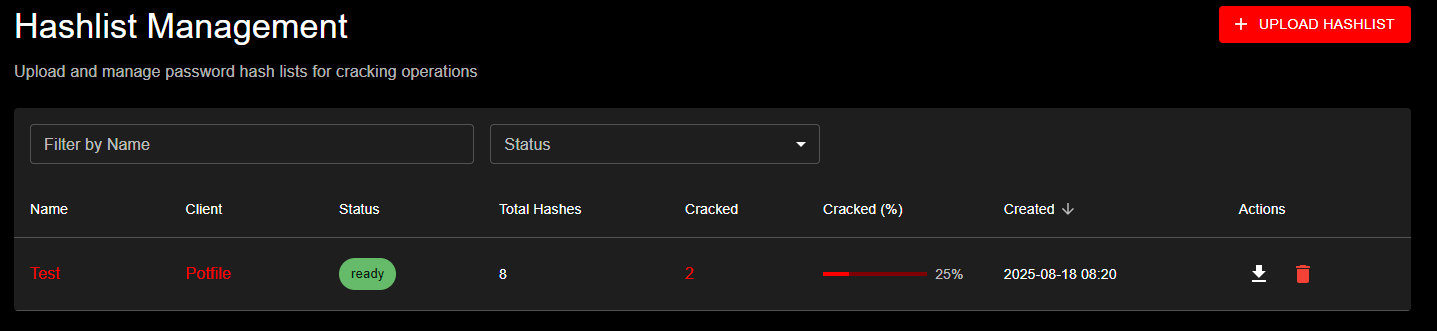 Hashlist Management page showing the upload interface with UPLOAD HASHLIST button and data table displaying hashlist details including Name, Client, Status, Total Hashes, Cracked percentages, and Created dates
- Initiate Upload: Click the "Upload Hashlist" button.
- Fill Details: In the dialog, provide:
- Name: A descriptive name for the hashlist.
- Hash Type: Select the correct hash type from the dropdown. This list is populated from the
hash_typestable in the database (see Hash Types below). The format displayed isID - Name(e.g.,1000 - NTLM). - Client: (Optional) Select an existing client to associate this hashlist with, or create a new one on the fly.
- File: Choose the hashlist file from your local machine.
- Exclude from global potfile: (Optional) When checked, cracked passwords from this hashlist will NOT be saved to the system-wide global potfile. This checkbox is only visible when the global potfile feature is enabled by an administrator. Default: unchecked (passwords ARE saved to the global potfile).
- Exclude from client potfile: (Optional) When checked, cracked passwords from this hashlist will NOT be saved to the client-specific potfile. This checkbox is only visible when the client potfiles feature is enabled by an administrator. Default: unchecked (passwords ARE saved to the client potfile).
Note: These two exclusion checkboxes operate independently. You can exclude from one, both, or neither. The settings are captured at upload time and apply to all future cracks from this hashlist. For details on how these interact with client and system-level settings, see the Three-Level Cascade System. 4. Submit: Click the upload button in the dialog.
API Endpoint
The frontend interacts with the POST /api/hashlists endpoint. This endpoint expects a multipart/form-data request containing the fields mentioned above (name, hash_type_id, client_id) and the hashlist file itself.
File Storage
- Uploaded hashlist files are stored on the backend server.
- The base directory for uploads is configured via the
KH_DATA_DIRenvironment variable. - Within the data directory, hashlists are stored in a specific subdirectory, typically
hashlist_uploads, but configurable viaKH_HASH_UPLOAD_DIR. - The maximum allowed upload size is determined by the
KH_MAX_UPLOAD_SIZE_MBenvironment variable (default: 32 MiB).
LM/NTLM Linked Hashlists (v1.2.1+)
When uploading hashlist files in pwdump format (commonly from Windows domain exports), KrakenHashes can automatically detect and create linked LM/NTLM hashlist pairs.
Automatic Detection
When you select a file containing pwdump-format hashes, the system automatically:
- Analyzes the file to detect both LM and NTLM hashes
- Counts hash types:
- Non-blank LM hashes (mode 3000)
- NTLM hashes (mode 1000)
- Blank LM hashes (constant:
aad3b435b51404eeaad3b435b51404ee) - Presents a dialog if both hash types are found
Example pwdump format:
DOMAIN\Administrator:500:01FC5A6BE7BC6929AAD3B435B51404EE:0CB6948805F797BF2A82807973B89537:::
DOMAIN\Guest:501:AAD3B435B51404EEAAD3B435B51404EE:31D6CFE0D16AE931B73C59D7E0C089C0:::
DOMAIN\User1:1001:E52CAC67419A9A224A3B108F3FA6CB6D:8846F7EAEE8FB117AD06BDD830B7586C:::
Linked Hashlist Creation Dialog
When pwdump format is detected, you'll see a dialog showing:
- LM hash count: Number of non-blank LM hashes found
- NTLM hash count: Number of NTLM hashes found
- Blank LM count: Number of blank LM hashes (will be skipped)
- Two options:
- Upload as Single List: Process as-is with your selected hash type
- Create Linked Lists: Create two separate, linked hashlists
Example:
Detected pwdump format file with:
- 1,428 LM hashes (non-blank)
- 1,500 NTLM hashes
- 72 blank LM hashes (empty password - will be skipped)

Would you like to create two linked hashlists for separate cracking workflows?

This will create "DomainDump-LM" and "DomainDump-NTLM" hashlists that are linked together.
Benefits of Linked Hashlists
Separate Attack Strategies: - LM hashes are much weaker (uppercase, 7-char halves) and crack faster - NTLM hashes are stronger but can be informed by cracked LM hashes - Run different wordlists/rules optimized for each hash type
Username/Domain Linking: - System automatically links hashes by matching username and domain - View correlation: which users have both LM and NTLM cracked - Analytics show linked pair statistics
Progress Tracking: - Each hashlist shows independent progress - Linked pairs counted as ONE hashlist in analytics overview - See correlation statistics (both cracked, only LM, only NTLM)
Analytics Advantages: - Windows Hash Analytics section shows linked correlation - LM Partial Cracks tracked separately - LM-to-NTLM Mask Generation uses cracked LM patterns to attack NTLM - Domain filtering works across both linked hashlists
Blank LM Hash Filtering
LM hashes with the constant aad3b435b51404eeaad3b435b51404ee indicate: - Password was blank/empty when LM hash was created, OR - LM hash storage was disabled (Windows Vista+ default)
These hashes are automatically filtered during processing: - Not counted toward total hash count - Not sent to agents for cracking - Appear in upload dialog count for awareness
When to Use Linked Hashlists
Use Linked Hashlists When: - Uploading pwdump format files (LM + NTLM) - Want to track LM and NTLM progress separately - Plan different attack strategies for each hash type - Need analytics on LM/NTLM correlation
Use Single Hashlist When: - File contains only one hash type - Prefer simpler management - Don't need separate progress tracking
Hashlist Processing
Once a hashlist file is uploaded and initial metadata is saved, it enters an asynchronous processing queue.
Status Workflow
A hashlist progresses through the following statuses:
uploading: Initial state when the upload request is received.processing: The backend worker has picked up the hashlist and is actively reading the file and ingesting hashes.ready: Processing completed successfully. All valid lines have been processed and stored. The hashlist is now available for use in cracking jobs.ready_with_errors: Processing finished, but one or more lines in the file could not be processed correctly (e.g., invalid format for the selected hash type). Valid lines were still ingested. Check backend logs for details on specific line errors. (Not fully implemented) `error: A fatal error occurred during processing (e.g., file unreadable, database error during batch insert). Theerror_messagefield on the hashlist provides a general reason. Check backend logs for more details.
Processing Steps
The backend processor performs the following steps:
- Fetch Details: Retrieves the hashlist metadata (ID, file path, hash type ID) from the database.
- Open File: Opens the stored hashlist file.
- Scan Line by Line: Reads the file line by line.
- Empty lines are skipped.
- Lines starting with
#are treated as comments and skipped.
- Extract Hash/Password:
- Default: Checks for a colon (
:) separator. If found, the part before the colon is treated as the hash, and the part after is treated as the pre-cracked password (is_cracked= true). If no colon is found, the entire line is treated as the hash (is_cracked= false). - Type-Specific Processing: For certain hash types (e.g.,
1000 - NTLM), specific processing logic might be applied to extract the canonical hash format from more complex lines (likeuser:sid:LM:NT:::). This logic is determined by theneeds_processingflag and potentially theprocessing_logicfield in thehash_typestable.
- Default: Checks for a colon (
- Batching: Hashes are collected into batches (size configured by
KH_HASHLIST_BATCH_SIZE, default: 1000). - Database Insertion with Deduplication: Each batch is processed:
- Deduplication Strategy: The system deduplicates by
original_hash(the complete input line), not just byhash_value. This ensures that different users with the same password hash are preserved as separate entries.- Example: Lines like
Administrator:...:hash123,Administrator1:...:hash123, andAdministrator2:...:hash123are all stored as distinct hash records.
- Example: Lines like
- The system checks if any hashes in the batch already exist in the central
hashestable (based onoriginal_hashand hash type ID). - New, unique hashes are inserted into the
hashestable with bothhash_valueandoriginal_hash. - Entries are created in the
hashlist_hashesjoin table to link both new and existing hashes from the batch to the current hashlist. - Cross-Hashlist Crack Propagation: When a hash is cracked, ALL hashes with the same
hash_value(across all hashlists) are automatically marked as cracked. Additionally, ALL hashlist files containing that hash are automatically regenerated to remove the cracked hash. This ensures:- If "Administrator", "Administrator1", and "Administrator2" share the same password across different hashlists, cracking one updates all three
- All affected hashlist files are regenerated with only uncracked hashes remaining
- Agents automatically download updated hashlist files on their next task
- The
cracked_hashescounter is incremented for each affected hashlist
- If a hash being added includes a pre-cracked password, the corresponding record in the
hashestable is updated (is_cracked=true,password=...).
- Deduplication Strategy: The system deduplicates by
- Update Status: Once the entire file is processed, the hashlist status is updated to
ready,ready_with_errors, orerror, along with the finaltotal_hashesandcracked_hashescounts.
Efficient Hashcat Processing
When generating hashlist files for hashcat: * DISTINCT Query: The system uses a DISTINCT query on hash_value to prevent sending duplicate password hashes to hashcat. Even if multiple users share the same password, hashcat only needs to crack it once. * Ordering: Results are ordered by hash_value for stable, consistent output.
LM Hash Special Processing (v1.2.1+)
LM hashes (hash type 3000) require special handling due to their unique structure. LM hashes consist of two 7-character DES-encrypted halves, resulting in a 32-character hex string.
How LM Processing Works
Structure: - Full LM hash: 32 hex characters (e.g., 01FC5A6BE7BC6929AAD3B435B51404EE) - First half: Characters 1-16 (represents first 7 chars of password) - Second half: Characters 17-32 (represents next 7 chars of password) - Maximum password length: 14 characters (7 + 7)
Agent Download Behavior: When agents download LM hashlists for cracking:
- Backend splits hashes: Each 32-char LM hash is split into two 16-char halves
- Unique halves streamed: System sends unique 16-char halves to agents (not full 32-char hashes)
- Automatic deduplication: Common halves (like blank constant
aad3b435b51404ee) appear only once - Hashcat processes independently: Each half is cracked as a separate 16-char hash
Why This Approach: - LM's DES encryption processes each half independently - Hashcat can't crack 32-char LM hashes; it expects 16-char halves - Deduplication reduces redundant work (many passwords share common halves) - Partial cracks are possible (one half cracked, not the other)
Partial Crack Tracking
When agents crack LM hash halves, the system tracks partial crack status:
Partial Crack States: - First half cracked: First 7 characters known (e.g., PASSWOR) - Second half cracked: Next 7 characters known (e.g., D123) - Fully cracked: Both halves known, full password assembled (e.g., PASSWORD123)
Database Tracking: - lm_hash_metadata table stores first/second half crack status - Each half stores its 7-character password fragment - When both halves crack, full password is assembled and hash marked complete - Partial cracks visible in hash table view and analytics
Strategic Value: Knowing one half of an LM password significantly reduces the keyspace for the other half: - Full 14-char LM keyspace: ~95^14 combinations - One half known: Reduces to ~95^7 combinations - See Analytics Reports for partial crack analysis
Blank LM Hash Constant
The blank LM hash constant aad3b435b51404eeaad3b435b51404ee appears when: - Password was empty when LM hash was created - LM hash storage was disabled (Windows Vista+ default) - Account created after LM storage was disabled
Processing Behavior: - Automatically filtered during hashlist processing - Not counted in total hash count - Not sent to agents for cracking - Appears in upload detection dialog for awareness
See Hash Types Reference for more details on LM hash structure and security implications.
Association Wordlists (v1.4.0+)
Association wordlists enable targeted password attacks where each candidate is tested against a specific hash in line-order correspondence.
What is an Association Wordlist?
An association wordlist contains password candidates where: - Line 1 is tested against hash 1 in your hashlist - Line 2 is tested against hash 2 in your hashlist - And so on...
This is useful when you have specific password intelligence for each user, such as: - Previously cracked passwords from other systems - Password hints or personal information - Known password patterns per user
Uploading Association Wordlists
- Navigate to the hashlist detail page
- Find the Association Wordlists section
- Click Upload Association Wordlist
- Select your file
- The system validates that line count matches hash count
Requirements and Validation
Line Count Matching: - The association wordlist MUST have exactly the same number of lines as there are hashes in the hashlist - Upload will fail if counts don't match - Example: Hashlist with 5,000 hashes requires association wordlist with 5,000 lines
Mixed Work Factor Warning: For hash types with variable computational cost (e.g., bcrypt with different cost parameters), association attacks are blocked because: - Hash order must match wordlist order - Mixed work factors mean hashes may be reordered during processing - The 1:1 correspondence would be broken
Work Factor Compatibility
Association attacks are not available for hashlists that contain hashes with mixed work factors. The hashlist detail page will show a warning if this applies to your hashlist.
Managing Association Wordlists
- View: See all association wordlists for a hashlist on the detail page
- Delete: Remove association wordlists you no longer need
- Reuse: The same association wordlist can be used across multiple jobs on the same hashlist
Creating Association Attack Jobs
- Go to Jobs and click Create Job
- Select your hashlist
- Choose Attack Mode 9 (Association)
- Select your association wordlist from the dropdown
- Optionally add rules for password variations
- Set priority and other options
- Submit the job
For more details on association attacks, see Association Attacks in the Jobs & Workflows guide.
Supported Input Formats
The processor primarily expects:
- One hash per line.
- Optional:
hash:passwordformat for lines containing already cracked hashes. - Lines starting with
#are ignored. - Empty lines are ignored.
- Specific formats handled by type-specific processors (e.g., NTLM).
Hash Types
- Supported hash types are defined in the
hash_typesdatabase table. - This table is populated by a database migration (
000016_add_hashcat_hash_types.up.sql) which includes common types and examples sourced from the Hashcat wiki. - Each type has an ID (corresponding to the Hashcat mode), Name, Description (optional), Example (optional), and flags indicating if it needs special processing (
needs_processing,processing_logic) or is enabled (is_enabled). - The frontend uses the
GET /api/hashtypesendpoint (filtered byis_enabled=trueby default) to populate the selection dropdown during hashlist upload.
Managing Hashlists
- Viewing: The "Hashlists" dashboard provides a sortable and filterable view of all accessible hashlists, showing Name, Client, Status, Progress (% Cracked), and Creation Date.
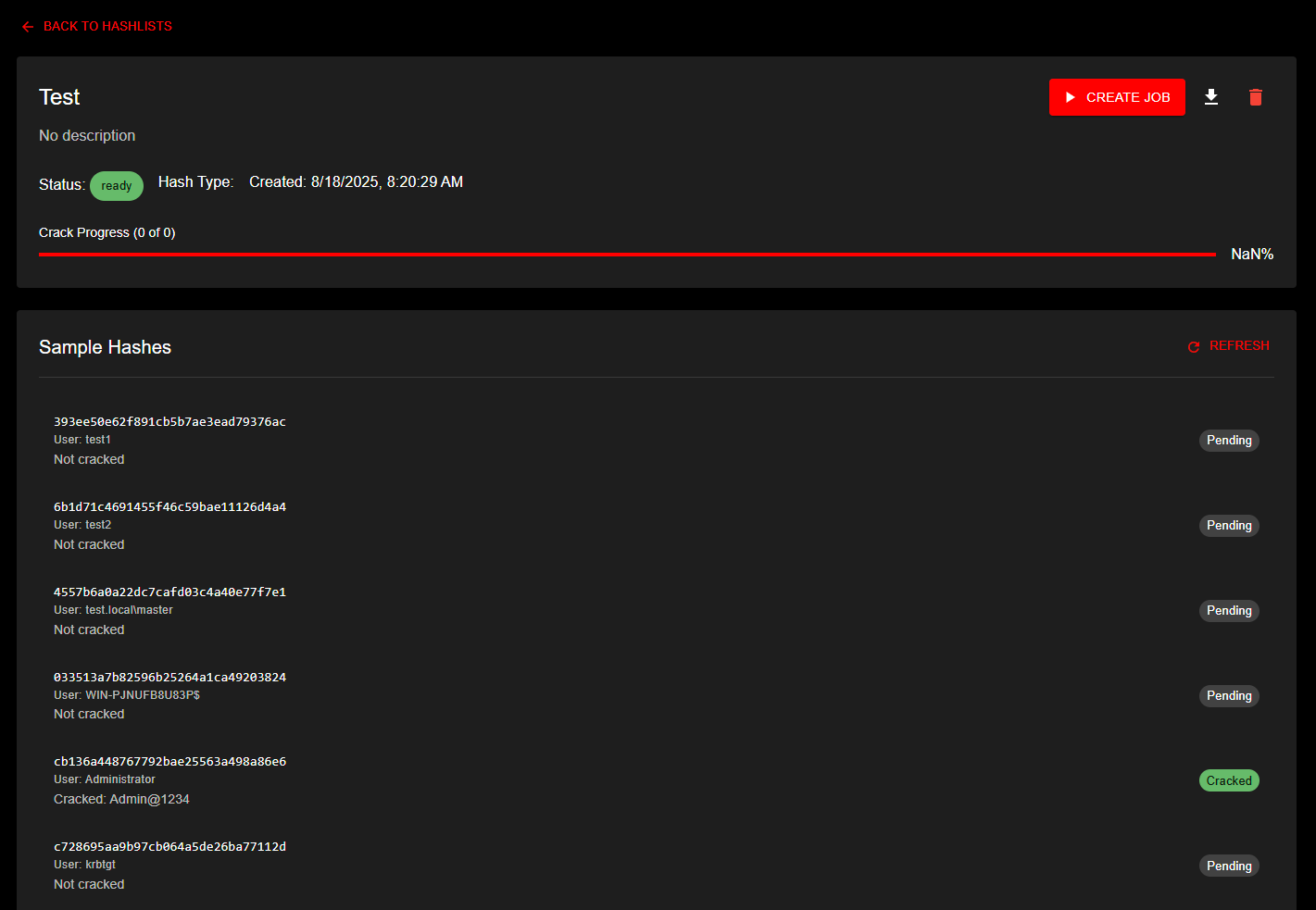 Detailed view of a hashlist named 'Test' showing ready status, crack progress indicator, and sample hashes section with individual hash entries and their crack status - Downloading: Use the download icon on the dashboard or the
 GET /api/hashlists/{id}/download endpoint to retrieve the original uploaded hashlist file. - Deleting: * Use the delete button in the hashlist detail view (with confirmation dialog) or the DELETE /api/hashlists/{id} endpoint. * Deleting a hashlist removes its entry from the hashlists table and removes associated entries from the hashlist_hashes table. * The original hashlist file is securely deleted from backend storage (overwritten with random data before removal). * Individual hashes in the central hashes table are not deleted if they are referenced by other hashlists. * Orphaned hashes (not linked to any hashlist) are automatically cleaned up. * Potfile Removal Options: The delete confirmation dialog may show two additional checkboxes: * Remove from global potfile: Surgically removes this hashlist's unique cracked passwords from the global potfile. Only shown when the hashlist is eligible (potfile was enabled and client was not opted out when cracks were written). * Remove from client potfile: Removes this hashlist's passwords from the client-specific potfile by regenerating the potfile from remaining hashlists. Only shown when eligible. * These checkboxes may be pre-checked based on system defaults and client-level overrides. If a client has forced removal settings, the checkboxes are locked and cannot be changed. * Via API: Pass optional JSON body {"remove_from_global_potfile": true, "remove_from_client_potfile": true} with the DELETE request. * For details, see Surgical Potfile Removal.
Viewing Individual Hashes
The hashlist detail page provides a comprehensive paginated table view of all hashes:
 Paginated table showing individual hashes with username, domain, original hash, cracked password, and status
Table Features: - Automatic Sorting: Cracked hashes appear first for easy review - Flexible Pagination: Choose 500, 1000, 1500, 2000, or view all hashes at once - Search Functionality: Filter hashes across all fields in real-time - Quick Copy: Click the copy icon to copy cracked passwords (or hash if not yet cracked) - Status Indicators: Color-coded chips show crack status at a glance
Table Columns: - Original Hash: The complete hash line as it was uploaded - Username: Automatically extracted username (when available) - Domain: Automatically extracted domain information (when available) - Password: The cracked plaintext password (displayed only when cracked) - Status: Visual indicator showing "Cracked" or "Pending" - Actions: Copy button for quick clipboard access
Username and Domain Extraction:
KrakenHashes automatically extracts username and domain information from supported hash formats:
- NTLM (1000): Parses pwdump format
DOMAIN\username:sid:LM:NT::: - NetNTLMv1/v2 (5500, 5600): Extracts from
username::domain:challenge:response - Kerberos (18200): Parses
$krb5asrep$23$user@domain.com:hash - LastPass (6800): Extracts email from
hash:iterations:email - DCC/MS Cache (1100): Extracts from
hash:username
Machine accounts (with $ suffix) are fully preserved: COMPUTER01$, WKS01$, etc.
Hashlist File Synchronization
Automatic Updates After Cracks
When hashes are cracked during job execution, KrakenHashes automatically maintains file consistency across all affected hashlists:
Update Process: 1. Agent reports cracked hashes via crack batch mechanism 2. Backend marks ALL matching hashes as cracked (by hash_value) 3. System identifies ALL hashlists containing the cracked hashes 4. Each affected hashlist file is regenerated with only uncracked hashes 5. Agents are notified that their local copies are outdated 6. On next task assignment, agents automatically download fresh files
Example Scenario:
Initial State:
- Hashlist A: 10,000 hashes (Administrator, User1, Guest, ...)
- Hashlist B: 5,000 hashes (john@corp.com, admin@corp.com, ...)
- Both contain hash "5F4DCC3B..." (password: "password123")

After Crack:
1. Agent cracks "5F4DCC3B..." while working on Hashlist A
2. Backend marks hash as cracked in central database
3. System finds that BOTH Hashlist A and B contain this hash
4. BOTH hashlist files are regenerated without the cracked hash
5. Hashlist A: 9,999 hashes remaining
6. Hashlist B: 4,999 hashes remaining
7. All agents with either hashlist are marked for update
Benefits: - No Duplicate Work: Agents never attempt already-cracked hashes - Consistency: All hashlists remain synchronized - Efficiency: File sizes shrink as cracks accumulate - Automatic: No manual intervention required
User Experience: - You may notice hashlist file sizes decreasing as cracks occur - Progress percentages update across all affected hashlists - Download hashlist via UI to get current uncracked hashes - Original uploaded file preserved if needed for audit purposes
Cross-Hashlist Impact
If you upload multiple hashlists that share common hashes (e.g., same organization, different departments):
Advantages: - Cracking work in one hashlist benefits all others - Faster overall completion across all hashlists - Reduced computational cost (each unique hash cracked only once)
Considerations: - More hashlists = more file regeneration operations per crack - Performance impact minimal for typical deployments (< 100 hashlists) - Monitor backend disk I/O during high-volume cracking sessions
Best Practices: 1. Group related hashlists (same organization/campaign) 2. Separate unrelated hashlists for clearer progress tracking 3. Use client associations to organize hashlist collections
For technical details on the cross-hashlist synchronization system, see Cross-Hashlist Sync Architecture.
Data Retention
Uploaded hashlists and their associated data are subject to the system's data retention policies. Old hashlists may be automatically purged based on client-specific or default retention settings configured by an administrator. See Admin Settings documentation for details.